
By PulsHealth. Updated
Real data exampleResearch reviewed . Figures use example Apple Health data.
What does heart rate in Apple Health mean?
Heart rate is the number of heartbeats per minute, usually written as bpm. Apple Health stores observations from watches, connected monitors and other apps. Each record has a value and a timestamp or time interval; it is not a list of every heartbeat.
Use this page to understand the shape of those records before interpreting a trend. Three questions make a large difference: which source recorded it, what was happening, and how often were readings saved?
How does Apple Watch measure heart rate?
Apple Watch's optical sensor uses light to detect changing blood flow at the wrist. Supported models also have an electrical sensor used through the Heart Rate or ECG apps. Fit, wrist blood flow, movement and some tattoos can affect optical measurements; an occasional extreme value can be an anomaly. Apple explains measurement modes and measurement limitations.
Recording behavior changes with hardware and settings. Apple's September 2026 documentation describes daylight measurements as often as every five seconds on Series 12 and Ultra 4 with continuous measurements enabled. That does not make a five-second schedule universal across Apple Health history. A stored timestamp span also does not describe the optical sensor's internal sampling frequency.
What did real Apple Health records show?
The figures use example Apple Health records, analyzed over a full reporting year with a 92-day focus. To avoid pooling different source groups, both charts select the source group with the most heart-rate records in that focus window. They show observations, not population targets.
| Recorded context | Readings | Median | Middle 90% of readings |
|---|---|---|---|
| Sleep overlap | 257 | 53 bpm | 48–60 bpm |
| Workout overlap | 32,248 | 118 bpm | 86–157 bpm |
| Other or unknown | 23,002 | 76 bpm | 60–116 bpm |
The sleep subset spans only five observed days, while workout readings span 48 and other readings span all 92. Another source supplied much of the recorded sleep data. The chart therefore illustrates both contextual differences and uneven source coverage; it cannot estimate a typical person's sleeping heart rate.
Contexts use timestamp overlap with recorded workouts and asleep intervals. “Other or unknown” includes ordinary movement, rest and missing context. It is not a resting-heart-rate measurement. A workout overlap is a useful label, but does not prove that the workout produced the sample.
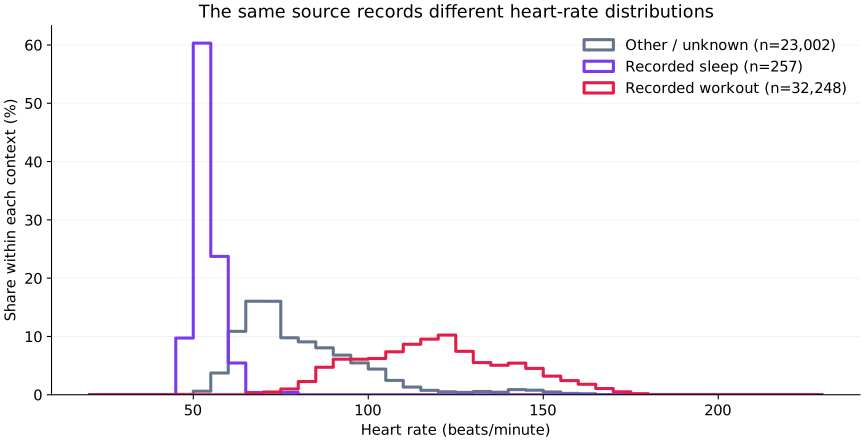
Heart rate changes with recorded context
Actual records from example Apple Health data. The selected source contributes 257 sleep-overlap readings across only five days, 32,248 workout-overlap readings across 48 days and 23,002 other readings across 92 days. These distributions are examples, not healthy target ranges.
View full-size figureHow this figure was made
92-day focus, America/Los_Angeles reporting calendar. Largest heart-rate source group by bundle identifier and display name; versions combined. Five-bpm histogram bins normalized within each context. Half-open timestamp overlap with recorded workouts or asleep categories; dual overlap omitted. No dates, identifiers or source display names shown.
How often are heart-rate readings recorded?
In the selected source, the median positive gap within recorded workout episodes was five seconds; the middle 90% was one to nine seconds. Within recorded sleep episodes, the median was about 4.1 minutes, with a middle 90% of roughly 43 seconds to 8.1 minutes. These are measured distributions for this example, not promised recording intervals.
The cadence figure shows the percentage of gaps at or below each duration. Workout and sleep curves exclude time between separate episodes. The other/unknown curve uses consecutive records in that context and can include both short bursts and long gaps. Comparing a single mean interval would hide these differences.
A day with readings does not establish continuous monitoring. A gap cannot by itself distinguish charging, non-wear, unavailable readings, recording policy or missing synchronization. Keep zero-length sample durations, zero timestamp gaps and missing intervals separate: they describe different things.
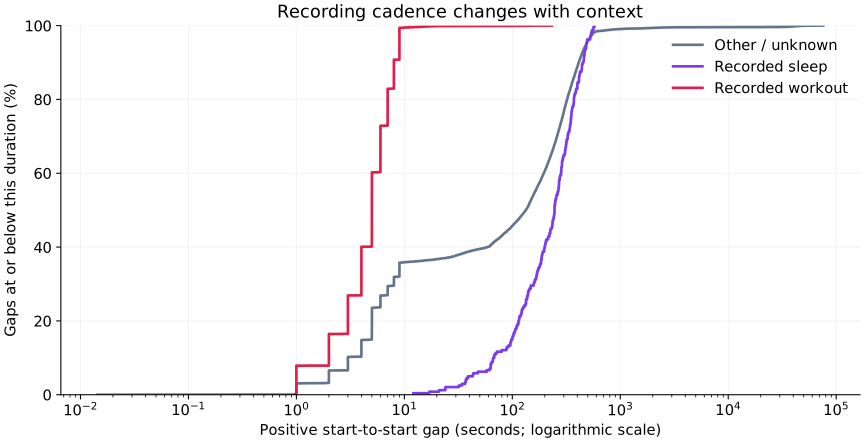
Cadence is a distribution, not a fixed schedule
Actual observations from the same selected source and 92-day window. Workout and sleep gaps are measured within merged recorded episodes, excluding time between episodes. Other/unknown uses consecutive same-context records and can include intervening episodes. Sleep coverage is limited to five observed days.
View full-size figureHow this figure was made
Positive start-to-start timestamp gaps; zero gaps excluded and assessed separately in the notebook. Each context normalized to 100%; x-axis logarithmic seconds. Sources are not mixed. Recorded asleep categories 1, 3, 4 and 5 merged for episode timing. Other/unknown is not a rest-only category. Stored cadence is not optical sensor sampling frequency.
Why can an average heart rate be misleading?
A mean across saved readings weights each record equally. When workouts generate many more records per minute, they contribute much more than their share of elapsed time.
In the full-year example, the mean across all 203,272 records was 81.6 bpm. Averaging each observed day's sample mean equally gave 75.6 bpm. Neither is a time-weighted all-day heart rate, and neither is Apple's dedicated resting-heart-rate estimate. The difference demonstrates how recording density and daily activity can change a summary.
Use the Resting Heart Rate entry for that separate estimate. For your own trends, compare like-for-like sources and contexts, and state the averaging method.
How should I interpret unusual values?
The full-year snapshot contained one stored zero. It was retained in the research and flagged as an invalid physiological heart-rate observation; silently deleting it would conceal a data-quality issue. Other low or high values were checked against neighboring readings, source and context. Some high readings appeared outside a recorded workout, showing why lack of workout overlap is not proof of rest.
A statistical outlier is a prompt to inspect a record, not a diagnosis or proof of sensor error. Check the same source's nearby readings, movement context and interval duration before deciding whether an observation belongs in a summary. Avoid turning a broad optical support range into a clinical normal range or a universal validation rule.
For adults who are calmly resting and feeling well, the American Heart Association describes 60–100 bpm as a usual resting range. Fitness, medication and sleep can produce lower values; exercise normally raises heart rate. Interpretation depends on the person and symptoms. AHA's heart-rate guidance advises urgent help for a sudden very high or low rate with symptoms such as chest pain, breathlessness, dizziness or fainting.
Which related measurements add useful context?
Heart-rate variability describes variation in beat intervals, not the number of beats per minute. Sleep-stage intervals, respiratory rate and workout timing can also help explain changing heart-rate patterns.
The research paired daily summaries with these types and compared workout phases and recorded sleep stages. These are exploratory comparisons within the example data. Different sampling schedules, medication, illness, movement and source changes can affect both measures. An association does not establish a mechanism; pooled all-day averages are especially vulnerable to recording-density effects.
What should developers preserve?
Keep canonical beats-per-minute values, original sample boundaries, source revisions and raw metadata. Heart-rate motion context uses 0 = not set, 1 = sedentary, 2 = active. Active includes movement or working out; it is not an explicit workout link. Apple documents the motion-context metadata.
Some historical exports serialized this enum as booleans. This research retained the original representation and applied the database's narrowly documented legacy decoder for this key only. Do not extend that conversion to arbitrary boolean metadata or reinterpret “not set” as sedentary.
Understanding your records
Recording frequency, source and coverage affect what you can conclude from this data. Read the recording guide.
- One record
- A numeric heart-rate observation can be a point or an interval. The stored timestamp span is not the optical sensor sampling rate.
- Frequency
- Recording frequency depends on device model, software, settings, activity and measurement mode. Compare distributions within a source and context; do not assume one fixed background or workout schedule.
- Context
- Separate recorded workouts, recorded sleep and other periods using explicit timestamp rules. Motion context active (2) includes movement or working out; it does not identify a workout session by itself.
- Coverage and gaps
- A day containing readings is not evidence of continuous wear or uninterrupted monitoring. A gap alone does not reveal whether the device was off, unreadable, not worn or simply not recording.
- Summaries
- A mean across records gives densely sampled periods more weight. State whether a summary is sample-weighted, time-weighted or computed by HealthKit; avoid treating these as interchangeable.
- Metadata
- HKMetadataKeyHeartRateMotionContext is a numeric enum: 0 not set, 1 sedentary, 2 active. Preserve unexpected representations as provenance; a known legacy serialization issue must not become a general boolean-to-number conversion rule.
Recording guidance reviewed 2026-10-08
Reference ranges
These source-specific ranges provide context; they are separate from the personal values in any data examples and do not diagnose a condition.
Adults at rest, sitting or lying calmly and feeling well
- normal
- 60–100 bpm
- low
- Below 60 bpm can occur with fitness, sleep or medication; interpret with symptoms and clinical context.
- high
- Above 100 bpm at rest can have many causes; persistent changes or symptoms warrant medical assessment.
| Population | normal | low | high |
|---|---|---|---|
| Adults at rest, sitting or lying calmly and feeling well | 60–100 bpm | Below 60 bpm can occur with fitness, sleep or medication; interpret with symptoms and clinical context. | Above 100 bpm at rest can have many causes; persistent changes or symptoms warrant medical assessment. |