
Two people can spend two hours wearing headphones and have very different sound exposure. The listening time is identical. The volume is what changes the picture.
That is the useful question behind the Headphone Audio Levels chart in Apple Health: how much sound, over how much time? A decibel reading without its duration answers only half of it. And a reassuring chart is only as complete as the listening that reached your phone.
Start with the headphones, then read the number
Apple says headphone measurements are most accurate with Apple or Beats headphones. For other headphones, the phone can estimate the level from its volume setting. That distinction matters before comparing a week with AirPods against a week with another pair. A change in the chart could include a change in measurement method. Apple's headphone-level guide
To find the history, open Health → Browse → Hearing → Headphone Audio Levels. Choose a day or a longer period, and use Show More Data for additional detail. For the current level while audio is playing, add the Hearing control to Control Center. Apple's instructions
I would start with one familiar session: a podcast, a commute, or an album. Does its time line up with the record? Which headphones were connected? Looking at a session you recognize is a better first check than trying to explain a monthly average.
A small change in decibels can mean a large change in exposure
The World Health Organization's listening guidance pairs 80 dB with 40 hours per week, but 90 dB with four hours. Those are reference durations, not a promise that every person can listen right up to a threshold without harm. WHO's safe-listening guidance
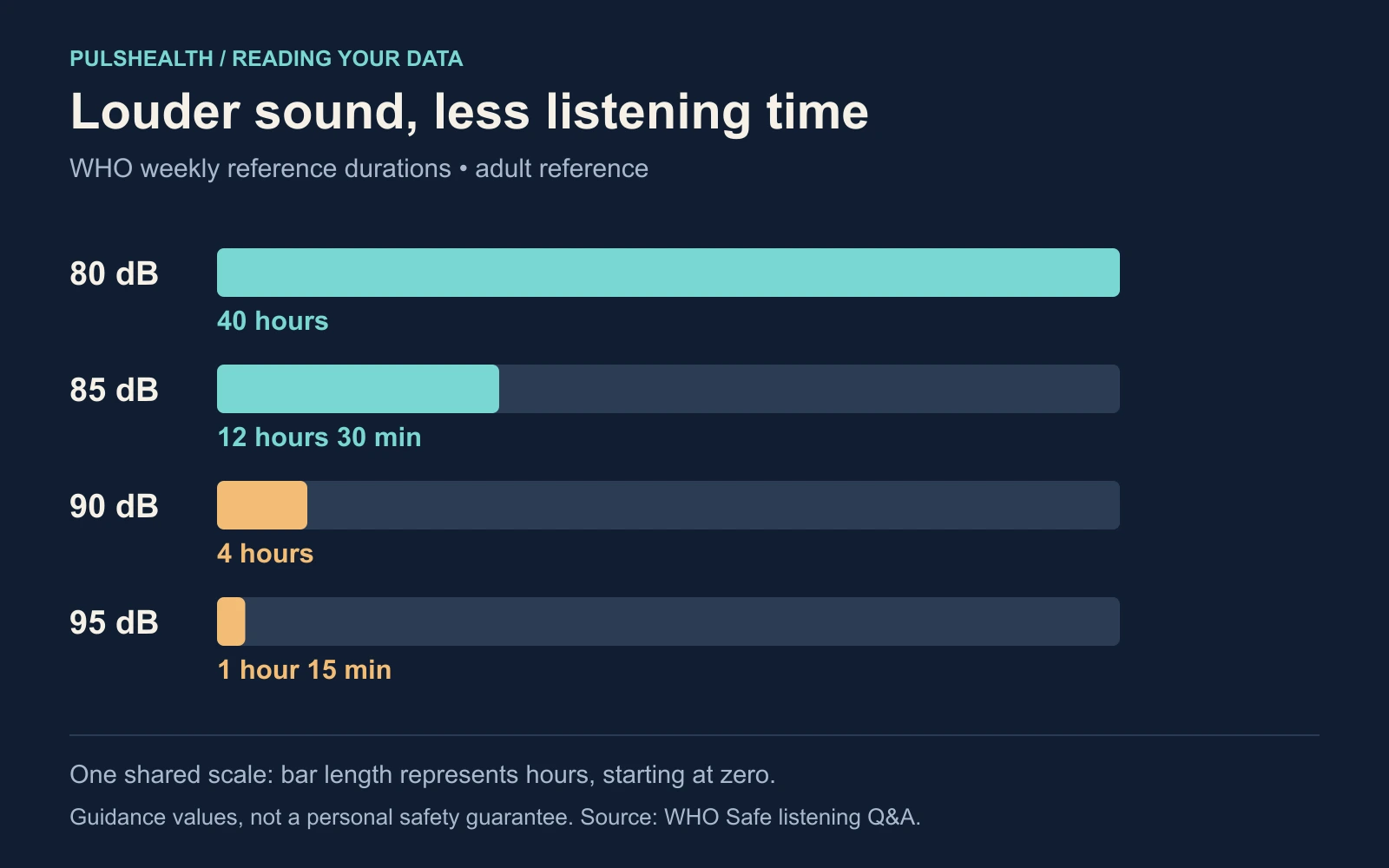
Here is a deliberately simple example. Imagine two separate two-hour sessions at constant levels:
| Illustrative session | Calculation against the matching WHO weekly reference | Share |
|---|---|---|
| Two hours at 80 dB | 2 hours ÷ 40 hours | 5% |
| Two hours at 90 dB | 2 hours ÷ 4 hours | 50% |
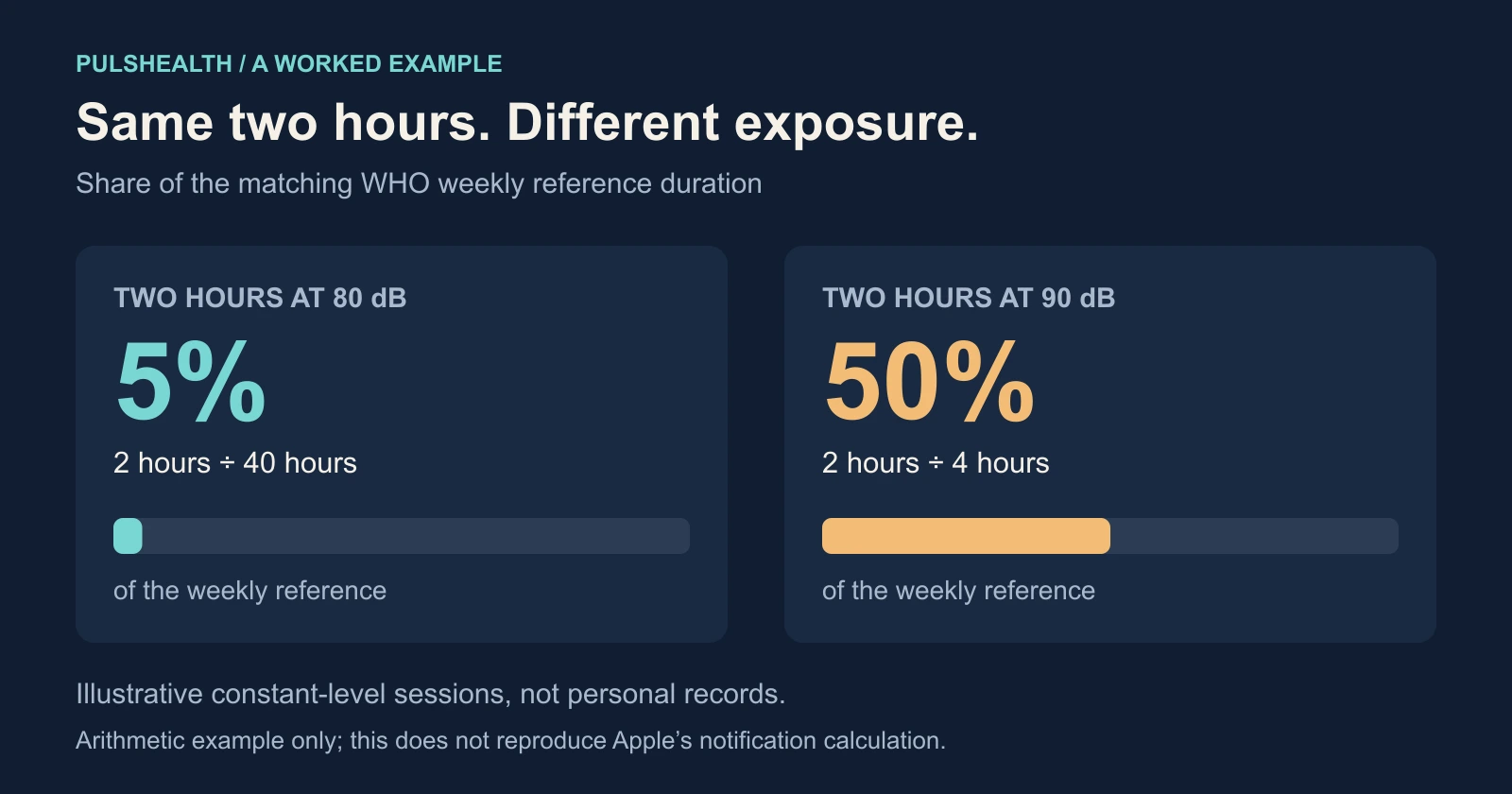
The denominator does the work here. “Only two hours” means little until you know the level. These percentages are simple arithmetic for the example; I would not present them as an exact reconstruction of the percentage shown on a particular iPhone.
WHO and ITU's device standard describes this broader idea as a sound allowance, combining exposure level and time. It distinguishes an adult reference of 80 dB for 40 hours from a more conservative mode of 75 dB for 40 hours intended for children. The figures above use the adult reference. WHO–ITU standard
What a headphone notification covers
Apple's notification looks at accumulated exposure over the preceding seven days. It can appear when you exceed 100% of the recommended allowance; this is not simply an alarm triggered by one loud instant. Apple's stated scope is media audio. Phone calls do not count toward this headphone exposure limit. Apple's notification explanation
That last detail is easy to overlook if you wear a headset for work. An afternoon of calls and an afternoon of music are both time in headphones, but the notification accounting does not treat them as interchangeable. No notification does not establish that the entire afternoon was quiet.
Likewise, the headphone chart is not a record of every noisy place you visited. HealthKit stores environmental audio exposure separately from headphone exposure. Keep those two series separate when reviewing them. Adding their dB values would not produce a meaningful total.
If you export the data, keep the time attached
Apple defines headphone exposure samples as equivalent continuous sound pressure levels, with A-weighted sound-pressure units. That is a level over an interval, not a count to add up like steps. HealthKit's data definition
For a first analysis, I would keep a table with these columns:
| Keep | What it lets you check |
|---|---|
| Start and end time | When the interval occurred and how long it lasted |
| Level and original unit | What the source reported |
| Source or device information, where available | Whether a change lines up with different equipment |
| Overlap or missing-data note | Whether the apparent history is complete enough to compare |
Do not treat each row as an equal amount of listening. Ten short records and one long record are different shapes of data. A plain average of their values would give every row the same influence, regardless of duration, and would ignore the logarithmic nature of decibels.
A useful first figure is much simpler: draw the recorded intervals on a timeline, keeping their levels visible. Mark gaps as unknown. Then ask which long or loud sessions recur. That gives you something concrete to investigate without pretending to have rebuilt Apple's exposure calculation.
The Headphone Audio Exposure reference describes the data type. If you want to inspect your records in a spreadsheet, the Apple Health export guide covers that workflow.
Make one change you can check next week
The practical setting is Settings → Sounds & Haptics → Headphone Safety → Reduce Loud Audio. It lets the phone reduce audio above the selected level. Apple's setting guide
Pick a recurring session and compare it over the next week with the same headphones. Was the recorded level lower? Was the listening duration similar? This is an easier comparison to interpret than a whole-month average across changing devices and habits.
WHO also recommends well-fitted, noise-cancelling headphones to reduce the temptation to turn up the volume in noisy surroundings, along with breaks from loud sound. Persistent ringing or difficulty hearing deserves a hearing assessment, whatever color the chart shows. WHO's advice
The chart is most useful when it leads to a specific observation: “These evening sessions are louder than I realized.” That is something you can act on and check again.