
A low cardio fitness notification can feel out of step with your experience. Perhaps you exercise regularly. Perhaps the number has dropped even though your routine has barely changed. Or perhaps it has not updated at all.
Those are three different questions. A low estimate needs interpretation; a falling series needs comparison; a missing estimate needs a recording check. Treating all three as the same problem usually leads to the wrong troubleshooting advice.
Updated October 8, 2026: checked current Apple instructions and research. Any personal-data analysis below was prepared for this revision.
What the number actually measures
VO₂ max describes maximal oxygen consumption during exercise. Apple Watch reports an estimate in milliliters per kilogram per minute, written mL/kg/min. A laboratory assessment uses exercise testing with respiratory gas measurement; the watch estimates from the relationship between activity and heart-rate response. Apple's technical paper explains that these are different measurement approaches. Apple's cardio fitness paper
The unit deserves attention. It expresses oxygen consumption relative to body mass, not a count of workouts or calories. Completing more sessions is not the same variable as receiving a higher VO₂ max estimate. Our VO₂ max data reference identifies the quantity stored in HealthKit.
Apple's current support page says estimates use Outdoor Walk, Outdoor Run, and Hiking workouts. Indoor workouts do not qualify. Classification is based on age and sex, while the estimate also considers profile information including height, weight, and relevant medications. Apple's current cardio fitness guide
That explains a common mismatch: your exercise history can be full while this particular measurement history is sparse.
If the estimate is low
First, check which claim the app is making. Write down the actual value, its date, and the displayed category. A category is a comparison with a reference group. It is not an explanation of why your value falls there.
Next, check the inputs. Review your Health profile for errors or stale measurements, including medication information. Correct factual errors; do not change truthful entries to obtain a preferred score.
Then look at the evidence behind the estimate. Was it a lone recent value or part of a repeated pattern? Can you locate the associated outdoor activity? Are there obvious recording gaps? These questions help distinguish a surprising result from a surprising result based on very little information.
A watch estimate can also differ materially from a laboratory test. A 2025 validation study enrolled 30 participants to compare Apple Watch estimates with maximal treadmill testing; 28 met the criteria for the final analysis. The watch underestimated VO₂ max on average by 6.07 mL/kg/min, with substantial variation in individual differences. That average is not a correction factor to add to your own result. The small study also does not establish how every watch version performs. Lambe and colleagues, PLOS ONE
The defensible conclusion is narrower: the displayed number is not interchangeable with a direct exercise-test result. A persistent low estimate is something you can discuss with a clinician in the context of your health and exercise tolerance; this troubleshooting guide cannot establish its cause.
If the number is falling
Open Health → Browse → Heart → Cardio Fitness, then compare the longer view with the individual records. Apple lets you inspect several time scales and the available classifications. Apple's viewing instructions
I would build a comparison around three questions:
Did the observations change? A month based on many readings and a month based on one are not equally well observed. Keep the count beside each monthly summary.
Did the measurement process change? Note watch replacements, software changes, profile corrections, and changes in the activities that produced readings. These do not prove the cause of a shift, but they identify breaks in comparability.
Did the underlying records change? Apple offers an option to revise past estimates. Note its use in exported analyses so rewritten history is not mistaken for new performance. Apple's data-update explanation
Avoid drawing a smooth line across a long gap and treating the line as measured progress. The connecting segment is a charting decision. The watch did not supply the values between its endpoints.
A fair comparison uses similar observation windows and makes exceptions visible. “The median of six recorded estimates was lower than the median of nine earlier estimates” is a more precise observation than “my fitness fell this month.” It still leaves the reason unresolved.
If cardio fitness is not updating
Check the recording pathway before resetting anything:
- Confirm the workout type. Check that it qualifies.
- Inspect the workout itself. Look for a plausible heart-rate trace and outdoor route recording rather than assuming that saving a workout guarantees every sensor worked.
- Allow an initial history to accumulate. Initial estimates can require a day of wear and several qualifying workouts.
- Check the latest sample date in Health. If Health has a recent estimate but another app does not, investigate that app's access or synchronization separately.
See Apple's initial-estimate requirements. Eligibility does not guarantee a value after every workout.
Apple's 2021 technical paper describes signal-quality and terrain requirements in the algorithm it validated. I would not turn that historical description into a universal workout-duration hack or a guaranteed rule for today's software. Apple's technical discussion
For a calibration problem, follow Apple's calibration procedure. Calibration is a recording-maintenance step; it is not evidence that a low estimate was wrong, nor a guarantee that the estimate will increase.
How often did my watch record an estimate?
I queried my synced HealthKit records for June 1 through September 30, 2026, using America/Los_Angeles calendar boundaries. There were 36 VO₂ max samples across 35 dates: eight in June, eight in July, nine in August, and eleven in September.
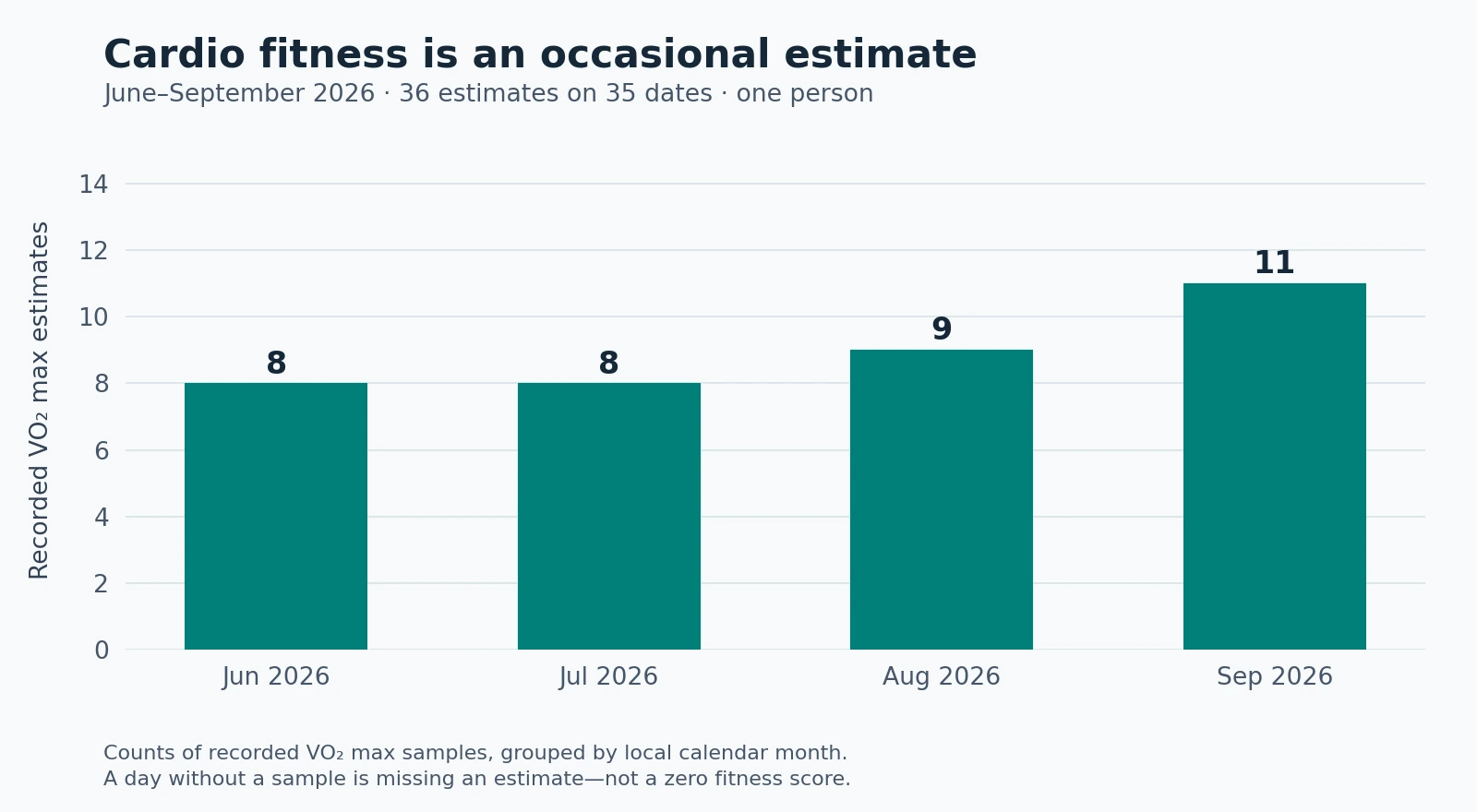
This example makes the missing-data problem visible. A daily chart covering those four months would have many dates with no estimate. Filling the gaps with zero would create a false series; carrying the last value forward would create values that were never measured.
The count does not establish how often another person's watch should produce estimates. It also does not tell us how many eligible workouts failed to produce one: answering that requires a separate workout-level comparison. The chart describes my stored observations and nothing more.
Analyze the history without inventing measurements
For a personal dashboard, keep the timestamp, value, unit, and source. Plot the actual observations as points. Summarize by week or month only after checking how many observations fall in each period.
These are the rules I would use:
- Keep missing periods blank. Zero would be a fabricated measurement.
- Do not sum VO₂ max samples. Adding two estimates does not produce a daily fitness total.
- Label any mean or median as a summary of recorded estimates.
- Retain enough detail to find the original samples behind a summary.
- Annotate known changes without automatically treating them as explanations.
If you add HRV or sleep beside cardio fitness, keep their sampling patterns separate. A dense sleep history cannot supply the missing VO₂ max readings. A correlation between two summaries also cannot tell you which change caused the other.
The most useful next step is to identify your actual question. For a low value, verify the inputs and consider the repeated pattern. For a decline, inspect comparable observations. For no update, check eligibility and the recording pathway. You will then have either a specific data problem to fix or a better-supported health question to discuss.