
The calorie number under a workout and the calorie number beside your Move ring are answering different questions. Neither is necessarily the amount of energy your body used that day.
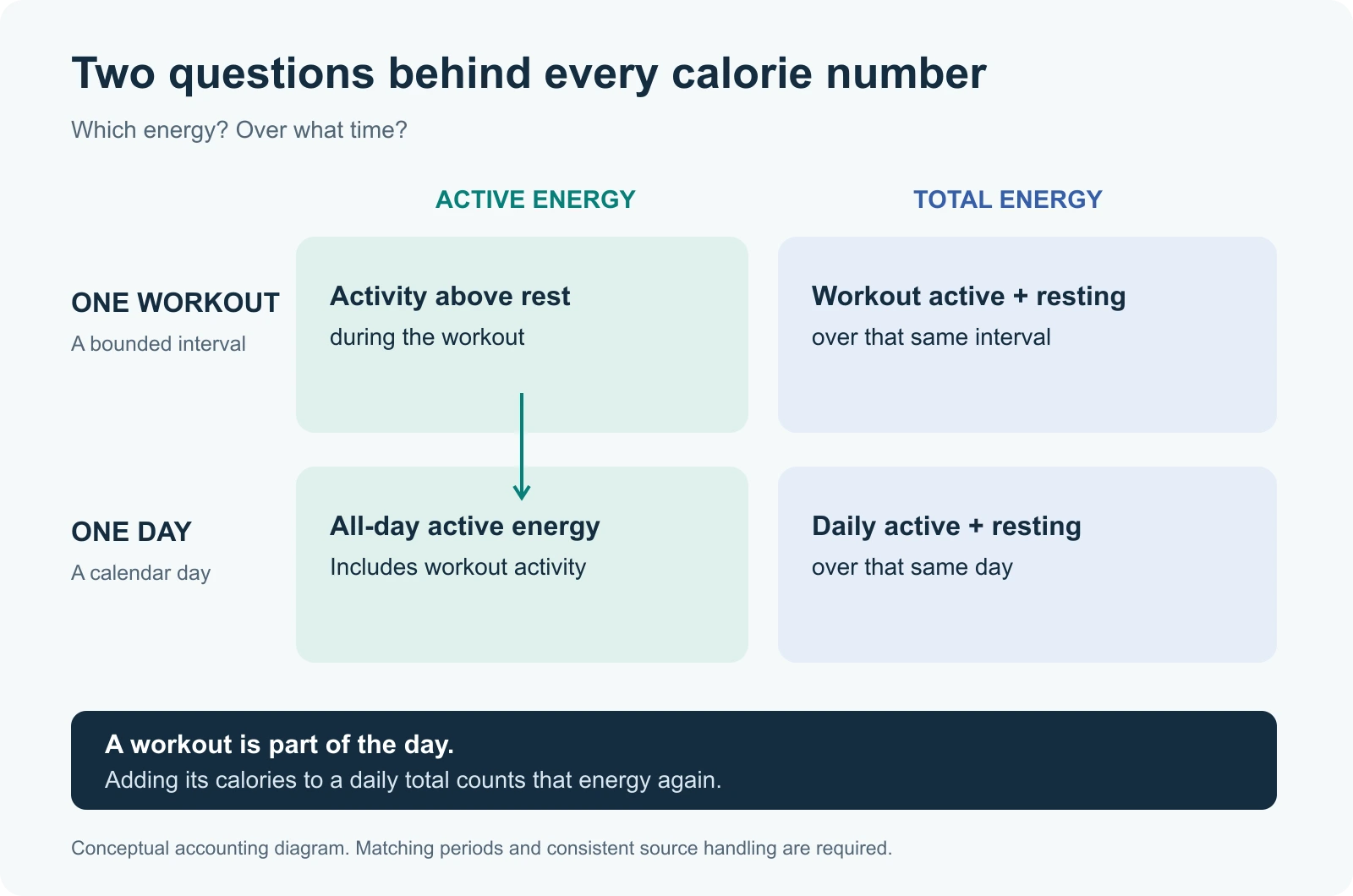
There are two distinctions to keep straight: active versus total, and workout versus day. Most confusing comparisons mix both at once.
Apple defines active calories as energy above the resting baseline, and total calories as active plus resting energy. The red Move ring tracks active calories. Apple's explanation of calorie measurement
Resting energy is the estimate for basic functions such as breathing and circulation. It isn't a counter that starts only when you sit down: the resting portion still exists during a workout. HealthKit stores it separately as Basal Energy Burned. Active Energy covers activity and exercise above that baseline; its samples should exclude resting energy. HealthKit's active-energy definition
One real day, including a mismatch
I used October 13, 2026 from my synced records: a completed day with a run and two cycling workouts. The reporting time zone was America/Los_Angeles, and I retrieved the records on October 25. I chose this day because it gives us several numbers to compare, not because it represents a typical day.
| Record or calculation | kcal, rounded |
|---|---|
| Daily Active Energy aggregate | 1,466 |
| Daily Resting Energy aggregate | 2,245 |
| Calculated daily active + resting | 3,711 |
| Running workout: active | 630 |
| Running workout: resting | 102 |
| Calculated running active + resting | 731 |
| Move ring, from the day's activity summary | 1,526 |
Calculations use the unrounded values. Rounding each component separately can make a displayed sum differ by one kcal.
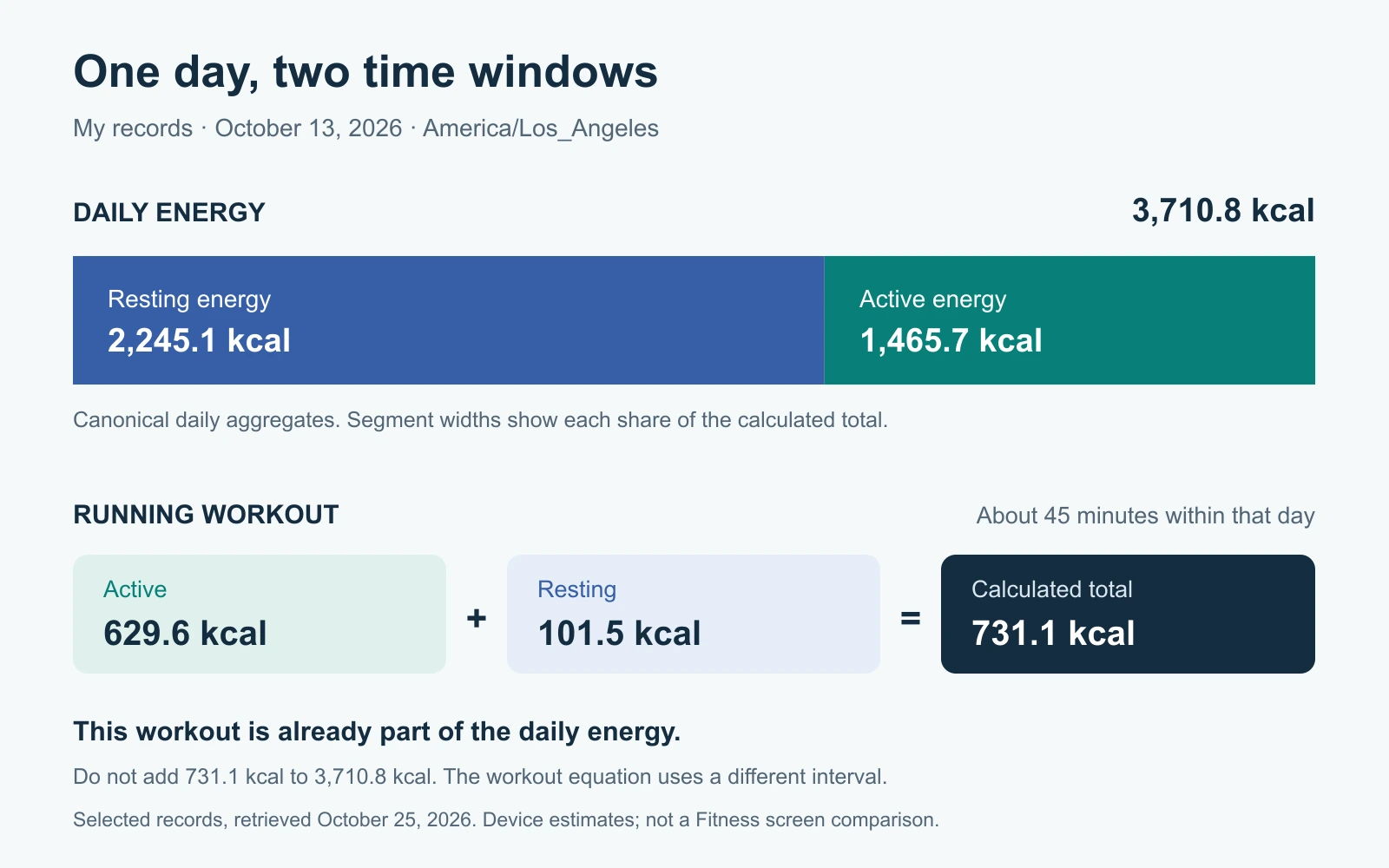
The run lasted about 45 minutes. Its workout statistics included both active and resting energy, so I could calculate their combined value. I did not compare that calculation with the Fitness app's workout screen.
For the daily total, I used canonical HealthKit daily aggregates for both components, not an all-source sum of raw samples. The three workouts had nonoverlapping intervals and Watch sources. Their active-energy values totalled about 942 kcal. Adding that amount to the daily active-plus-resting figure would produce 4,652 kcal: a double-counting calculation, not a new estimate of the day.
The Move ring creates a less tidy comparison. Its stored value was about 60 kcal higher than the daily Active Energy aggregate. Both concern daily active energy, but these snapshots were refreshed on different dates: October 22 for the energy aggregates and October 15 for the ring summary. That establishes a freshness difference, not the cause of the discrepancy. I haven't verified either against the phone's display. The figure preserves the aggregate values; it doesn't replace one with the ring value to make the arithmetic look cleaner.
That distinction matters: knowing the definition tells you which numbers should be comparable. It doesn't prove that every saved snapshot will agree.
Try the accounting yourself
In this example, change the workout's share while leaving daily active energy alone. The daily total stays the same. You're moving energy between “workout” and “other activity,” not discovering additional calories.
Where do the workout calories go?
Try changing the workout share. It divides the day’s active energy; it does not get added again to the total.
1,800 resting + 700 active = 2,500 kcal
The 700 active kcal already include 400 workout kcal and 300 other active kcal. If you lower daily active energy below the workout share, the workout share comes down with it.
The numbers are illustrative. The arithmetic assumes compatible records for the same day, with the workout already included. Real exports require a source check before treating everything as neatly additive.
A misleading word in workout exports
There is a naming trap worth catching before making a spreadsheet: HealthKit's older workout field, totalEnergyBurned, means total active energy during the workout. Despite the word “total,” it doesn't mean active plus resting energy. Apple now recommends accessing workout statistics instead. Apple's field definition
PulsHealth reads the workout's Active Energy statistics for its workout calorie value. A totalEnergyKcal field in the sync format, or the workout energyKcal CSV column, therefore describes active energy. It isn't a copy of the Fitness app's active-plus-resting “Total Calories” number. The export reference describes the available fields.
That means two valid calculations can both be labelled “total” somewhere:
- The total active energy accumulated within a workout.
- The active plus resting energy accumulated within that interval.
Read the field's definition before comparing them. A familiar-looking column name isn't enough.
How to check your own day
Pick a completed day first. Today's totals change while you're looking at them, and an export made earlier won't include later activity.
Find Active Energy and Resting Energy in Health using its search, then select the same date for both. Compare those with the day's activity summary and any workout you want to inspect. Write the interval next to each number: “whole day” or the workout's start and end.
For an export, check four things before adding:
- Units. Keep kilocalories (
kcal) and kilojoules (kJ) separate until converted. The figures in this article use kcal. - Day boundaries. Group both daily series using the same local calendar. A late evening workout can fall on tomorrow's UTC date.
- Source handling. A daily statistic is different from adding every raw observation from every app or device. Inspect Health's Data Sources & Access before assuming that overlapping records represent additional energy. Apple's source-management guide
- Missing values. An absent resting-energy value isn't zero. Keep the combined total unavailable until both parts are present.
In PulsHealth, prefer the canonical daily aggregates when available, and retain their provenance. Its metric_daily view can otherwise use a raw-data fallback; that calculation should not silently become “the Health app's number.” See the daily metric rules and the worked example of overlapping step records.
A correct sum is still an estimate
Getting the bookkeeping right doesn't validate the underlying calorie estimate. The Watch uses personal details and sensor inputs; Apple recommends keeping Health Details current, choosing the appropriate workout, wearing the Watch correctly, and calibrating it. Those checks are more useful than trying to force two differently defined numbers to match. Apple's measurement guidance
A daily active-plus-resting total is an estimate of energy expenditure. It doesn't contain a measurement of what you ate, and the subtraction won't become precise just because a spreadsheet displays decimal places.
For comparing activity across days, use the same definition and calculation each time. For understanding one workout, keep the interval confined to that workout. And when a workout is already represented in the day, leave it there: adding it again doesn't represent more exercise.