
Your Watch shows one step count. Health on your iPhone shows another. Export the records, add the values in a spreadsheet, and you may get a third number—sometimes a much larger one.
That disagreement does not automatically mean your steps are duplicated or your export is broken. These views may be answering different questions: what one device recorded, what Health calculated across devices, or what every individual record adds up to.
Start by comparing one completed day, using the same time zone, and identifying how each total was calculated. Today's moving total makes a poor debugging target.
Updated October 8, 2026: this edition explains the current PulsHealth daily-value calculation and includes an analysis of my own exported records.
1. Find out which devices contributed
In Health, open Browse → Activity → Steps, then find Data Sources & Access. Inspect the list before changing anything. Apple lets you order contributing sources; the highest source takes priority when multiple sources contribute that type. A newly added source can change the order. Apple's source-management guide
An iPhone in your pocket and a Watch on your wrist can both observe the same walk. Their records can be individually valid while overlapping in what they describe. Two sources do not imply twice the movement.
Here is a deliberately simplified example, not a reconstruction of Apple's algorithm:
| Recording interval | Watch record | iPhone record |
|---|---|---|
| 9:00–9:10 | 900 steps | 850 steps |
| 9:10–9:20 | 1,000 steps | 950 steps |
| Raw total | 1,900 steps | 1,800 steps |
Adding both columns yields 3,700. But both devices observed the same twenty minutes. Neither that sum nor an average of the columns is automatically the correct combined result.
This is why a raw export and a daily summary are different products. Raw records preserve observations and their provenance. A daily summary applies rules to those observations.
2. Separate overlapping observations from repeated uploads
People use “duplicate” for two different problems:
- The same HealthKit object appears twice. A retry or repeated file import may have copied an existing record. Inspect the object's identity, not just its value.
- Different objects describe overlapping activity. The Watch and phone can create distinct records for the same walk. Removing repeated identifiers will not resolve that overlap.
PulsHealth's database protects raw quantity records against repeated inserts using their sample identity, with a key containing the HealthKit UUID and start timestamp. Sending an acknowledged page again does not create another copy of those rows. That protection is separate from deciding how much activity overlapping devices represent. Database reference
Conversely, two records containing “120 steps” are not necessarily duplicates. They could describe separate walks. Deleting rows simply because their values match destroys information.
Before editing your history, inspect the record's source, interval, and identifier where your export exposes one. Treat a suspected double count as a calculation problem until you have evidence of an erroneous record.
3. Check whether you exported records or statistics
HealthKit offers statistics queries that merge sources before calculating values. It also lets developers request statistics separately by source. Consequently, an app asking HealthKit for a daily cumulative sum is doing different work from a script adding every raw step record. Apple's statistics documentation
In PulsHealth there are three relevant paths:
| Value | How it is produced | What to watch for |
|---|---|---|
| Raw step samples | Individual HealthKit records | Sources can overlap |
| Daily HealthKit aggregate | Statistics computed on the phone | Check interval, source filter, and freshness |
metric_daily | Preferred aggregate, with a server fallback | Inspect the source field |
For steps, metric_daily prefers a sum, one-day interval, all-device HealthKit aggregate. A Watch-only sum, hourly series, or maximum is not a substitute for that particular daily definition.
If the canonical daily bucket is unavailable and the type has a qualifying sum configuration, the fallback uses the highest single-source daily sum. It does not add every device together. This reduces obvious overlap, but it is a fallback rule—not a reproduction of Apple's source-merging algorithm. It can miss complementary activity: for example, a phone records the morning and a Watch records the evening. PulsHealth's daily metric rules
An aggregate is not guaranteed to match a screenshot of Health taken at another time. Permissions, query boundaries, and newly arrived records still matter. When comparing, record both the calculation method and the time you checked it.
What happened in my own export
I compared thirty complete local days of my own synced data, September 1–30, 2026, using America/Los_Angeles calendar boundaries. Adding all raw step records by their start day produced 413,146 steps. The canonical daily HealthKit aggregates totalled 230,642 steps, rounded to a whole step. The naive raw total was 79.1% higher.
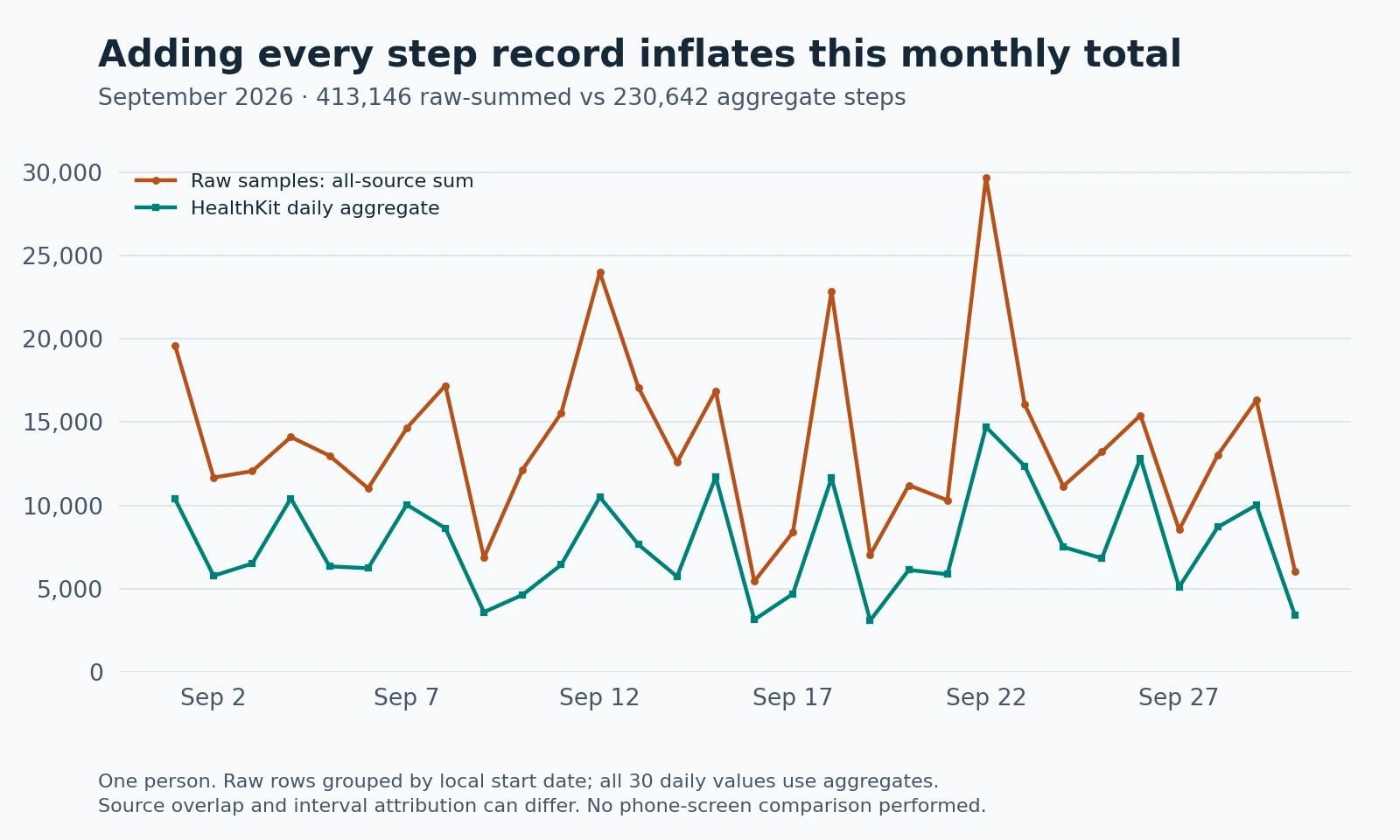
All thirty daily values had source = aggregate; this comparison did not use PulsHealth's fallback. On September 1 alone, the raw sum was 19,621 and the daily aggregate was 10,389.
The finding is specific: adding the raw records did not reproduce the stored daily statistics. Overlapping sources are a reason to expect differences, but this comparison does not isolate their exact contribution. Assigning a whole raw interval to its start day can also differ from interval-aware aggregation. I did not compare these values with the Health app on the phone, so this is not a claim that the teal series exactly matches its display.
4. Make sure “Tuesday” means the same interval
A timestamp is an instant; a calendar day depends on a time zone. A spreadsheet grouping UTC dates can assign an evening walk to the following day even though Health groups it with your local evening.
HealthKit statistics collections also depend on their interval anchor. A one-day interval anchored at 3 a.m. creates boundaries at 3 a.m., rather than midnight. “Daily” alone does not specify the boundary. Apple's interval explanation
For a useful comparison:
- Choose a completed day without a recent time-zone change.
- Use local midnight to the next local midnight, rather than assuming every day contains exactly 24 hours.
- Check the export's offset and the chart's time zone.
- In a self-hosted PulsHealth installation, confirm
PULS_TIME_ZONEmatches the intended phone calendar zone.
Travel requires an explicit convention: the day at your destination, the day in your home zone, or the zone carried by each record. These are different analytical choices. Document yours instead of treating a shifted total as missing movement.
Check the metric and unit too. Step count is a count; walking distance is a distance. Converting miles to kilometres cannot resolve a mismatch between different metrics.
5. Compare freshness before changing source priority
A raw sample can reach the server before a recomputed daily bucket. The current day also changes as more activity arrives. An export saved yesterday is a snapshot, even when today's dashboard is current.
Open the syncing app with the phone unlocked, run a sync if it provides that action, and compare a completed day again. If Health contains recent records but the receiving app does not, work through the sync troubleshooting guide.
Changing source priority is useful when you have deliberately chosen which device to trust. It is not a universal repair for an old export, a server fallback, or a UTC grouping error. Changing it will not rewrite a CSV already on your computer.
A reliable comparison checklist
Write down the date, time zone, source filter, and last refresh for each number. Then label the method: raw sum, single-source sum, HealthKit aggregate, or server fallback.
If only the raw all-source sum is larger, investigate overlapping intervals. If adjacent days gain and lose similar amounts, investigate date boundaries. If the discrepancy disappears after an unlocked sync, investigate freshness. If a fallback differs from HealthKit, compare the calculation rules before treating either number as a damaged record.
For a spreadsheet you intend to use every week, export a clearly defined daily series and keep raw records for investigation. The export reference explains the available formats. A useful chart starts with a number whose meaning you can explain.